Guides
Run the whole loop by asking for it
Turing is the agent that drives the four tools. You describe the goal; it picks the steps, runs them, and hands each result to the matching bench tab.
Updated 31 July 2026
All documentation
On this page
Turing is the view the engine opens on, and it is the only surface that can use more than one tool in a single request. You describe what you are trying to build; it decides which tools to call, calls them, and puts each result on the bench beside the conversation.
The four tools are its verbs. Anything Turing produces, you can open in the tool that produced it and keep working by hand.
Ask for an edit
The composer takes a goal, not a form. Three worked examples ship as buttons on the empty state — this guide follows the middle one:
Knock out TP53 in human cells with CRISPR
You do not supply a sequence. TP53 is a gene symbol, and resolving it is the
agent’s first job.
Plain language, but be specific about the organism
TP53 alone is ambiguous across species. Naming the organism — “in human
cells” — is what lets the agent resolve a single transcript instead of
asking you which one.
Watch it plan
Before calling anything, Turing writes the plan into the transcript and then ticks the steps off as they complete:
PLAN
  ✓ Fetch the human TP53 sequence
  ✓ Fold the TP53 structure for the Structure tab
  ▸ Design CRISPR knockout guides against TP53
Each step then expands into a card showing what was called, what came back, and how long it took. From the run above:
| Step | Result | Time |
|---|---|---|
| Resolving sequence | TP53 · ENST00000269305 · CDS 1,182 nt |
2 s |
| Folding structure | TP53 · human · P04637 |
1 s |
| Designing guides | 20 guides ranked | 0 s |
| Checking primers | 5 primer pairs | 1 s |
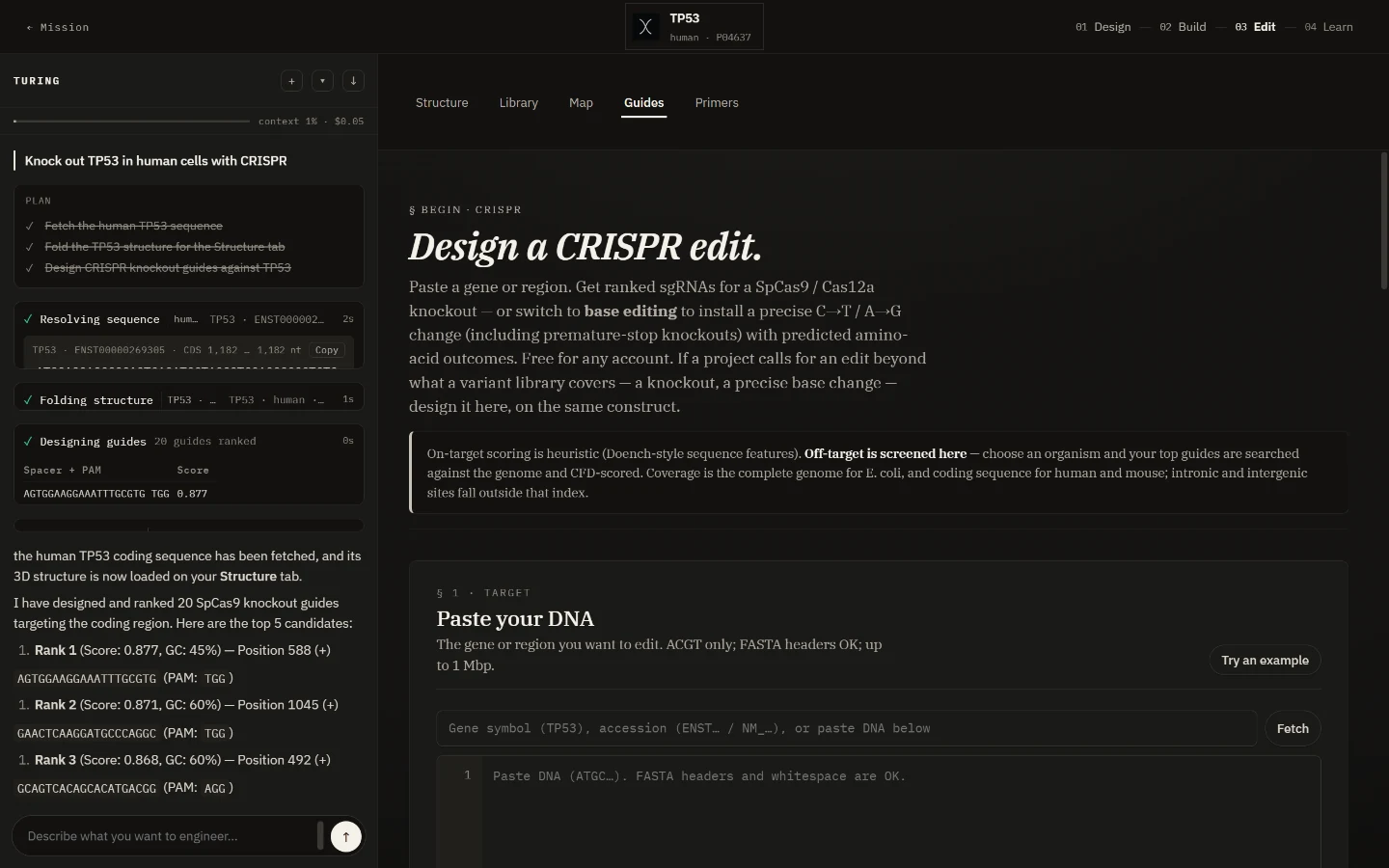
The cards collapse to thin rules once they finish, so a long run stays readable. Click one to reopen it.
Read the answer
Turing summarises in prose and shows the shortlist. The real run returned:
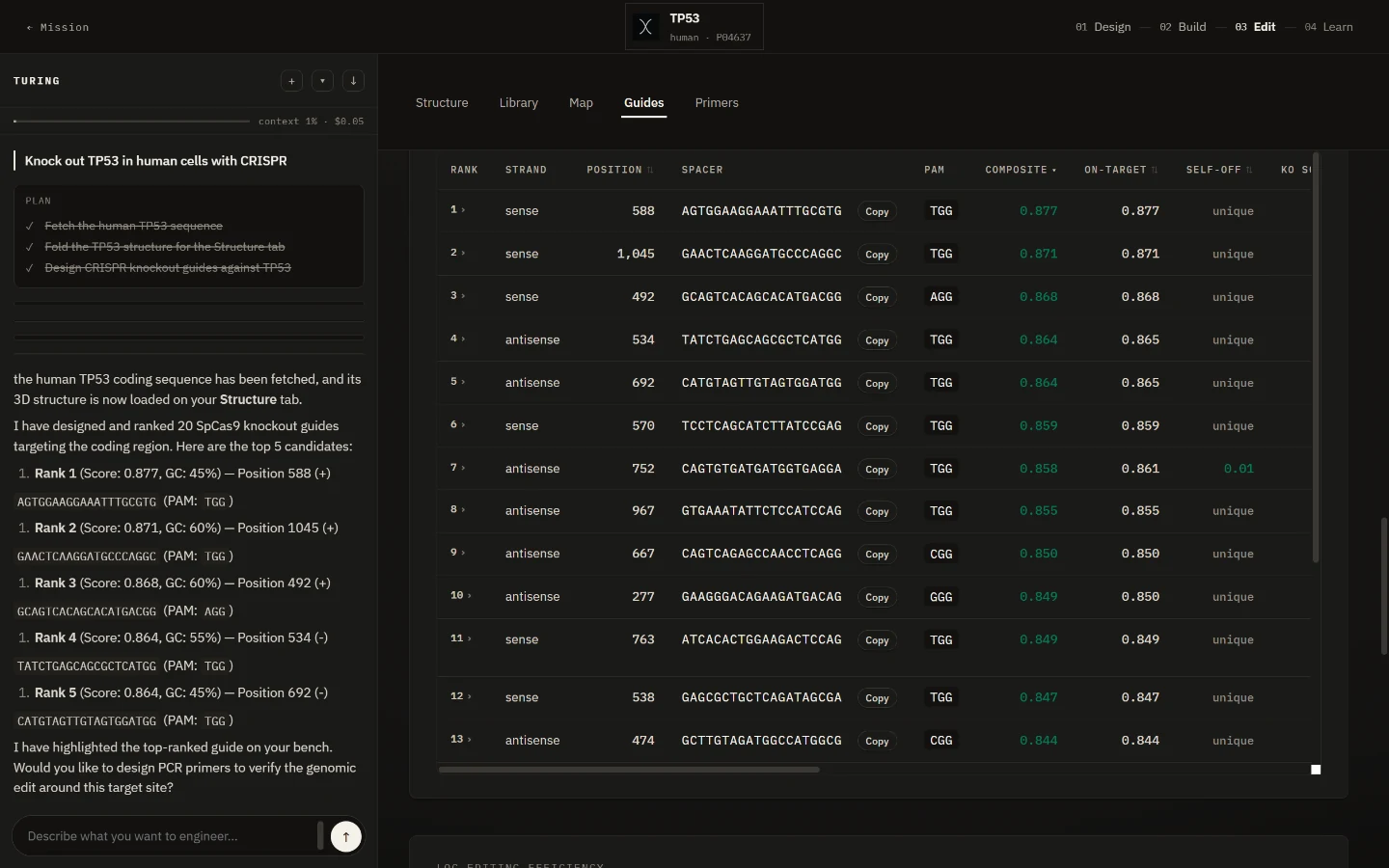
Rank 1 (Score: 0.877, GC: 45%) — Position 588 (+)
  AGTGGAAGGAAATTTGCGTG   PAM: TGG
Rank 2 (Score: 0.871, GC: 60%) — Position 1045 (+)
  GAACTCAAGGATGCCCAGGC   PAM: TGG
Rank 3 (Score: 0.868, GC: 60%) — Position 492 (+)
  GCAGTCACAGCACATGACGG   PAM: AGG
Rank 4 (Score: 0.864, GC: 55%) — Position 534 (−)
  TATCTGAGCAGCGCTCATGG   PAM: TGG
Rank 5 (Score: 0.864, GC: 45%) — Position 692 (−)
  CATGTAGTTGTAGTGGATGG   PAM: TGG
The in-chat table is a shortlist, not the analysis
Turing shows two columns — spacer with PAM, and score. The CRISPR designer shows twenty, including the predicted indel spectrum, frameshift percentage, base-editor windows and ready-to-order cloning oligos. Use Open in CRISPR designer → on the step card before you order anything.
Keep going in the same conversation
Turing offers the next step, and it carries the context. Answering the offer above with:
Yes — design primers to verify the edit at the top guide's cut site.
was enough — it already knew which guide was ranked first and where it cut:
the Rank 1 guide (AGTGGAAGGAAATTTGCGTG) cuts at position 588.

Pair 1 (Product: 132 bp)
  Forward: AGCATCTTATCCGAGTGG   Tm 59.8 °C
  Reverse: AGTTGTAGTGGATGGTGG   Tm 59.8 °C
Pair 2 (Product: 390 bp)
  Forward: AGCATCTTATCCGAGTGG   Tm 59.8 °C
  Reverse: GTTTCTTCTTTGGCTGGG   Tm 59.8 °C
It also explained the trade-off without being asked: the 132 bp product suits a quick gel or melt analysis, while the ~390 bp products give a wider window for Sanger sequencing across the cut site.
Find results on the bench
The panel to the right of the conversation is the bench. It has one tab per artifact, and Turing switches to whichever tab it just wrote to:
| Tab | Filled by | What lands there |
|---|---|---|
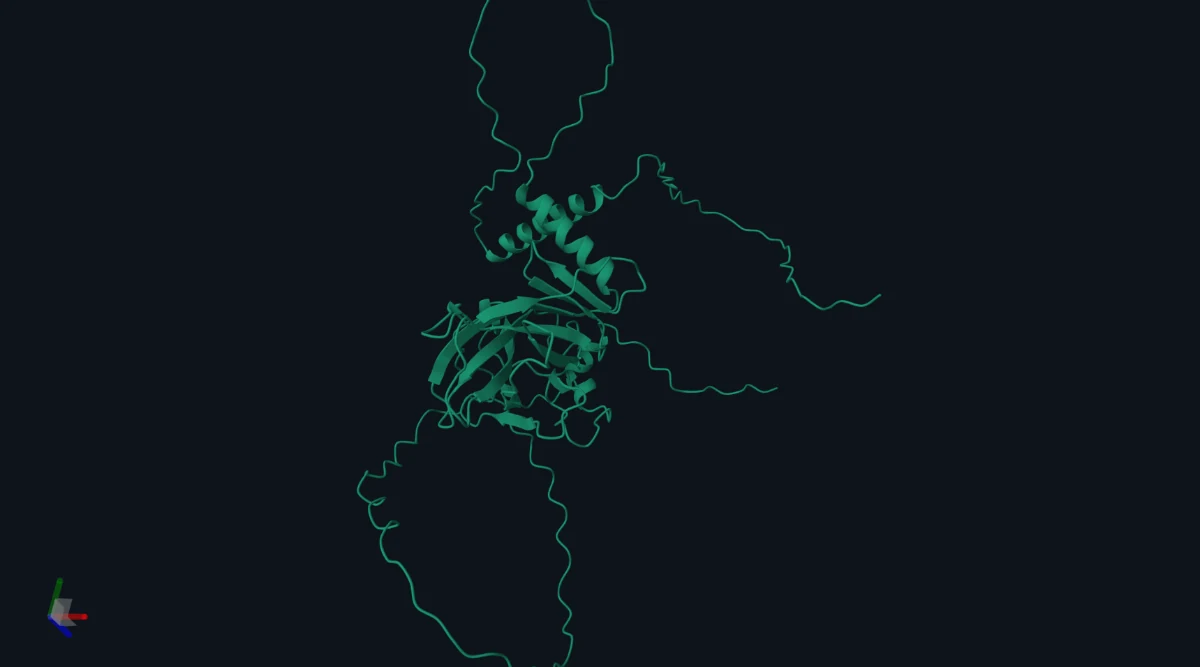
| Structure | a fold | The AlphaFold model, rotatable |
| Library | Directed Evolution | The ranked variant table |
| Map | Plasmid Editor | The annotated construct |
| Guides | CRISPR | The full twenty-column guide table |
| Primers | Primer Analysis | The scored pairs |
The header above the tabs becomes the construct’s identity — TP53 · human ·
P04637 — and the loop indicator moves from 01 Design to 03 Edit on its
own, because designing a knockout is an Edit-phase job.
Scroll the bench
Results render below the tool’s own input form, which stays empty. Landing on the Guides tab and seeing “Paste your DNA” does not mean the handoff failed — the table is further down.
What it costs, and stopping it
The rail header carries a live meter — context used and spend so far. The run in
this guide reached context 1% · $0.05 after the guides, and $0.11 after the
primers.
A Stop button appears next to the meter while a run is in flight. The other three controls persist:
- + starts a new conversation, clearing the bench.
- ▾ reopens a past run.
- ↓ exports the current run.
Where the agent stops and the tool starts
Turing’s guide design does not screen the genome
Designing guides took under a second because it searched only the sequence it fetched. The genome-wide off-target screen is a separate, slower step you run in the CRISPR designer by choosing an organism. A guide Turing calls top-ranked has not been checked against the rest of the genome.
Two more boundaries worth knowing:
- Primers arrive as text. Opening them in Primer Analysis carries the template across, but not the candidate primers — copy those from the conversation into the primer box yourself.
- Nothing is saved automatically. Use Save design in the tool view, or export the run from the rail, before starting a new conversation.
Research use only, on every path through this page.